Ampero Mini · Dubshift 2.0
A groovebox in your guitar pedal
Dubshift 2.0 is our own firmware for the Ampero Mini, written from the screen down to the sound engine. It turns the pedal into a synth, a drum machine, a sequencer and a looper that all run on one clock, with your guitar as one more track in the mix.
Six sections, one bar at the bottom
Everything is one tap away
The screen keeps the same layout everywhere: transport and tempo on top, the section's pages as tabs, the footswitch roles on a strip, and the six sections along the bottom. Each section has its own colour.
SYNTH
A 303 that edits like an instrument
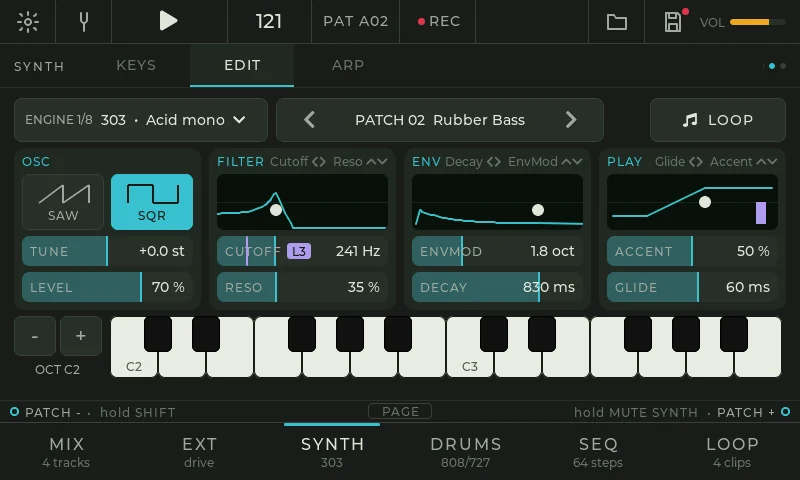
EDIT
One page, four groups: oscillator, filter, envelope and play. Every group has a graph you drag with a finger and sliders under it. The keyboard below lets you hear each change while you make it, and LOOP repeats a note so both hands stay on the sound.
- Wave saw · square
- Tune ±12 st
- Cutoff 30 Hz–12 kHz
- Reso to self-oscillation
- Env mod 0–6 oct
- Decay 30 ms–2.5 s
- Accent
- Glide 5–500 ms
- Level
Factory patches to start from: Rooftop Acid, Rubber Bass, Squelch, Dub Sub, Saw Lead. Step through them with the footswitches.
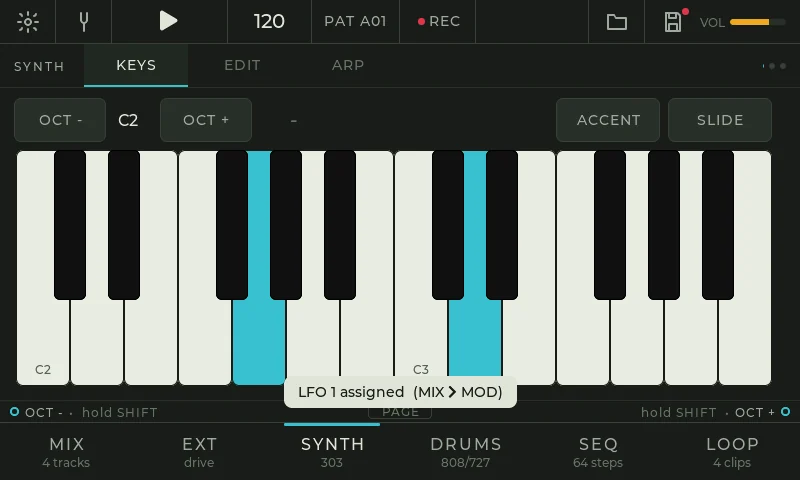
KEYS
Two octaves of big keys you play with several fingers. The synth is mono, so the newest finger sounds. ACCENT and SLIDE are buttons above the keys, and OCT moves the range.
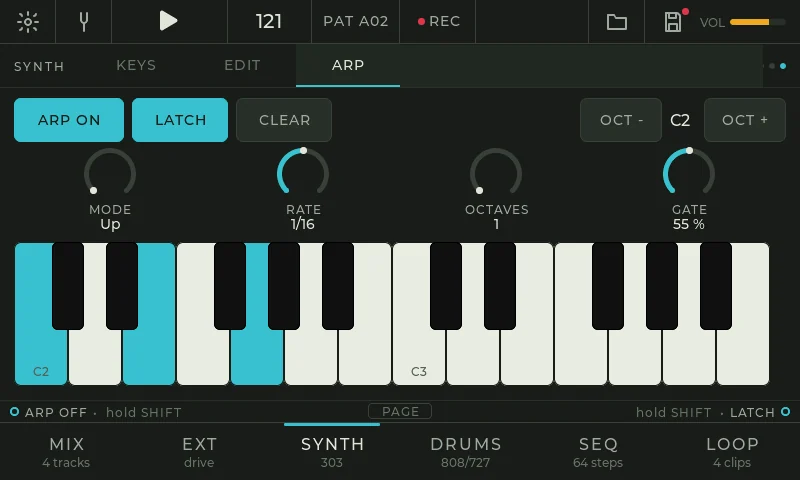
ARP
The arpeggiator runs on the sequencer's clock, so it is always in time with the drums. With LATCH, tap keys one by one to build a chord, then take your hands off and play the guitar over it. The latched chord is saved with the project.
- Mode up · down · up/down · random · as played
- Rate 1/8 · 1/16 · 1/32
- Octaves 1–4
- Gate 10–100 %
- Latch
- Up to 16 notes
DRUMS
808 and 727, synthesized, not sampled
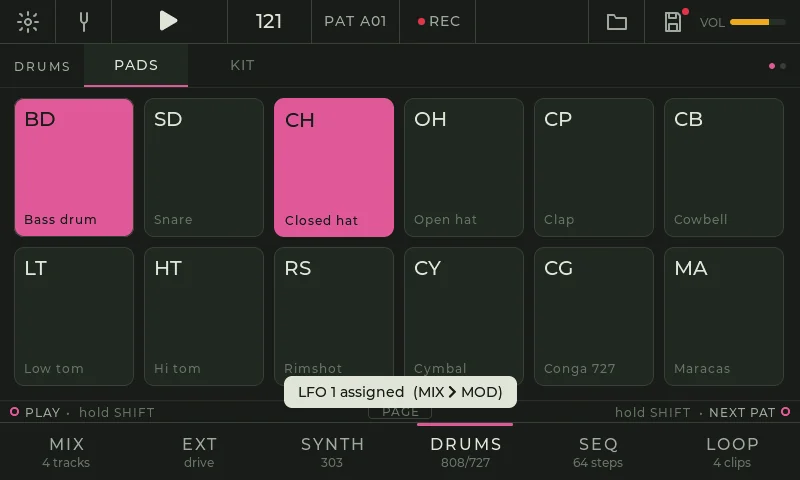
PADS
Twelve voices modelled on the 808 and the 727: bass drum, snare, closed and open hat, clap, cowbell, low and high tom, rimshot, cymbal, conga and maracas. Every voice is made from oscillators, noise and filters, the way the original circuits make them. Pads play with several fingers, and the closed hat chokes the open one.
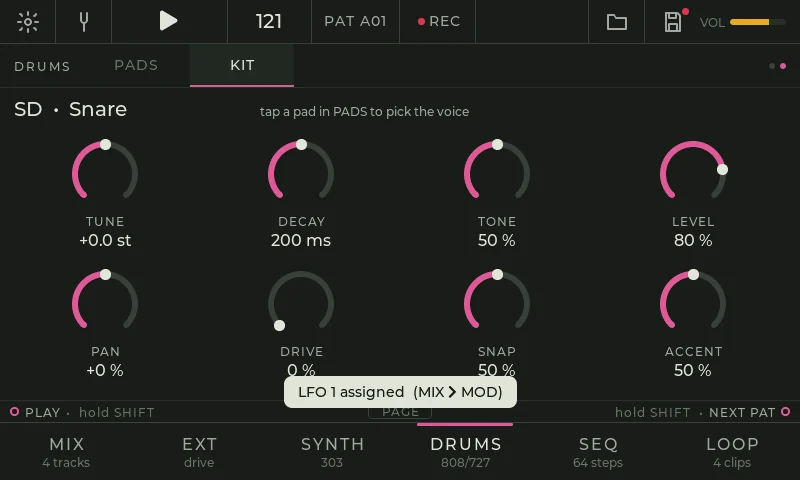
KIT
Tap a pad, then shape it. Every voice has its own set of knobs, and any of them can follow an LFO or change per step.
- Tune ±12 st
- Decay
- Tone
- Level
- Pan
- Drive
- Snap snare
- Accent
SEQ
64 steps, every knob per step
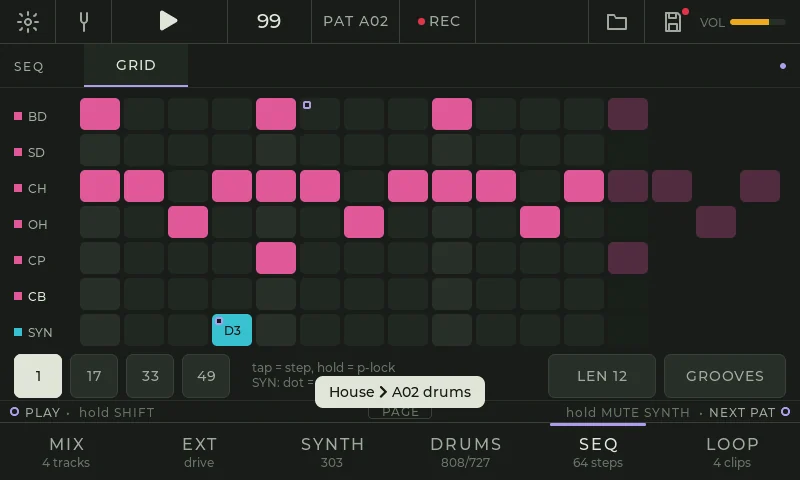
GRID
Drum lanes and a synth lane on one grid. Tap a step to set it. Hold a step to open its p-lock panel and turn any knob: that value plays on that step only. The sequencer runs inside the audio engine, so every step lands on the exact sample.
- 12 drum lanes in two banks
- 1–64 steps
- Pages 1 · 17 · 33 · 49
- LEN per pattern
- Parameter locks
- Accent and slide on the synth lane
- Swing to 60 %
- Live record from pads and keys
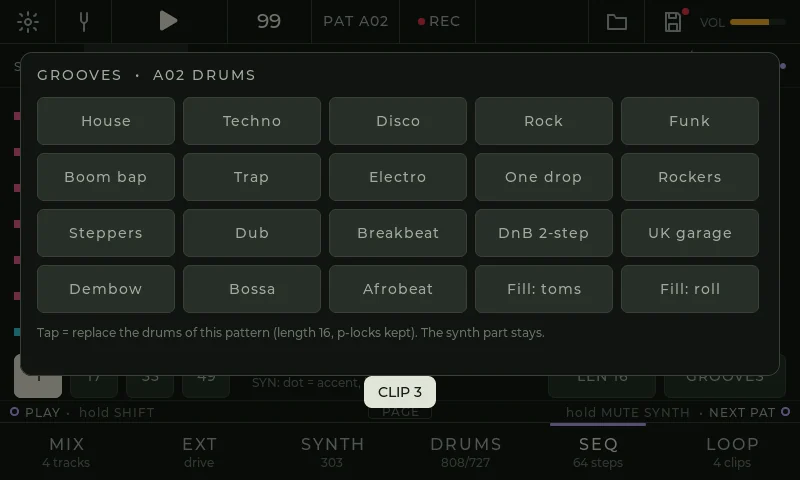
GROOVES
Twenty ready drum patterns to start from: House, Techno, Disco, Rock, Funk, Boom bap, Trap, Electro, One drop, Rockers, Steppers, Dub, Breakbeat, DnB 2-step, UK garage, Dembow, Bossa, Afrobeat and two fills. A groove replaces only the drums of the pattern, so your bassline and p-locks stay.
LOOP
Four clips that never drift
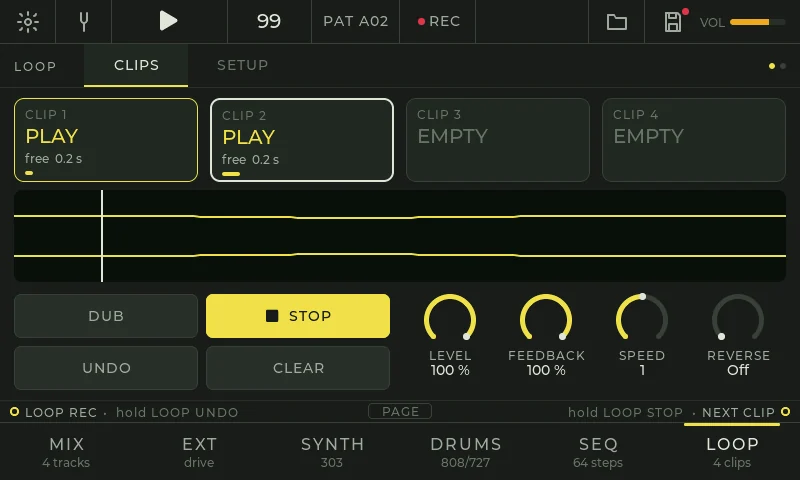
CLIPS
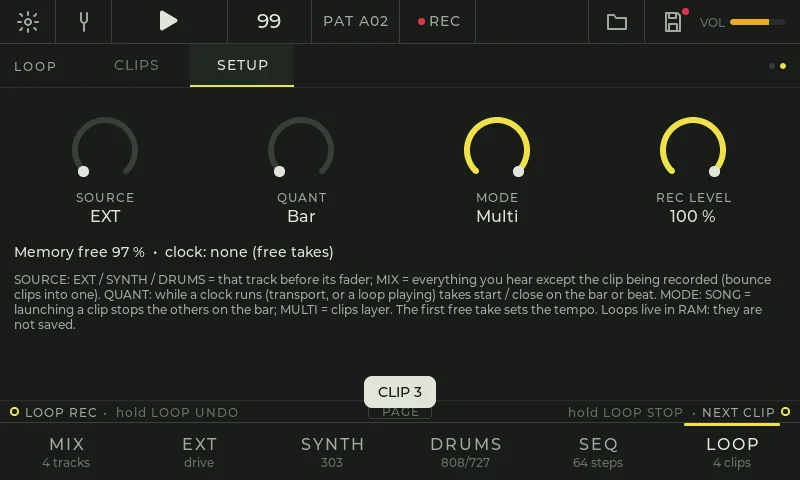
With nothing playing, the first loop you record is free: when you close it, the pedal works out its tempo, and the drums and the synth follow it. While the transport runs, a take arms, starts on the next bar and closes on the bar, so loops are always whole bars and stay in phase for as long as they play.
- 4 clips
- REC · DUB · PLAY · STOP
- Undo / redo
- Level · Pan · Feedback
- Speed ½ · 1 · 2
- Reverse
- Clean seam crossfade
- About 2½ minutes of audio
SETUP
Pick what you record: the guitar, the synth, the drums, or the whole mix to bounce clips together. In Song mode launching a clip stops the others on the bar; in Multi mode clips layer.
- Source EXT · SYNTH · DRUMS · MIX
- Quant bar · beat · off
- Mode song · multi
- Rec level
EXT
Your guitar, with its own chain
CHAIN
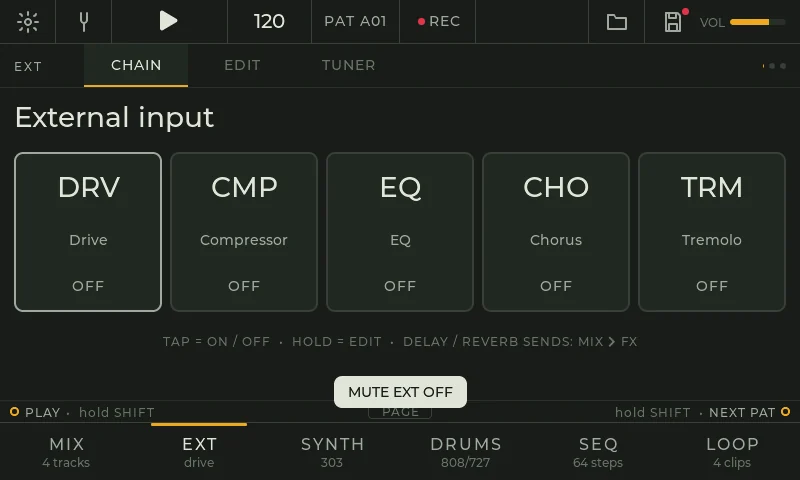
The guitar or line input runs through five blocks: drive, compressor, EQ, chorus and tremolo. Tap a block to switch it on or off, hold it to edit. After the chain the guitar is a track like the others: its own fader, sends into the delay and the reverb, and it can feed the looper. Any of its knobs can follow an LFO.
- Drive drive · tone · level
- Comp threshold · ratio · attack · release · makeup
- EQ bass · mid · treble ±12 dB
- Chorus rate · depth · mix
- Tremolo rate · depth · sine / square
The Ampero's amps, cabs and stock effects are not part of 2.0 Groovebox; they come later with 2.0 Guitar.
TUNER
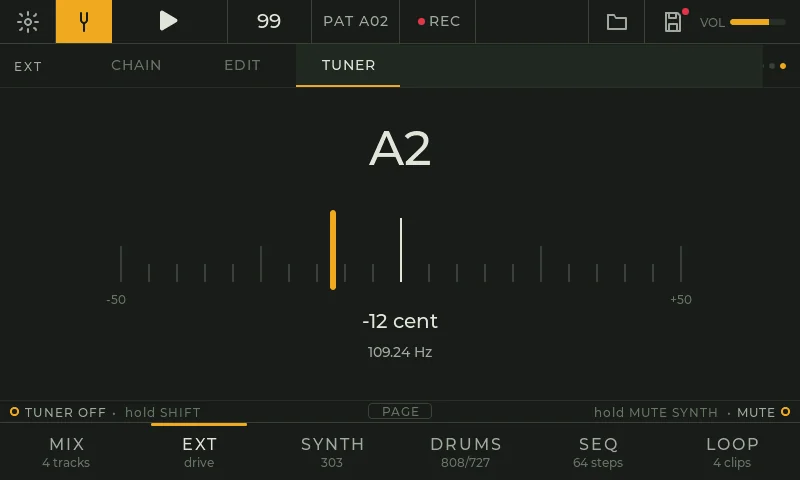
A tuner on the tuning-fork icon, the menu or a footswitch: note, cents, a needle and the frequency, from 40 to 700 Hz, so it covers bass too.
MIX
Modulation and effects for everything
MOD
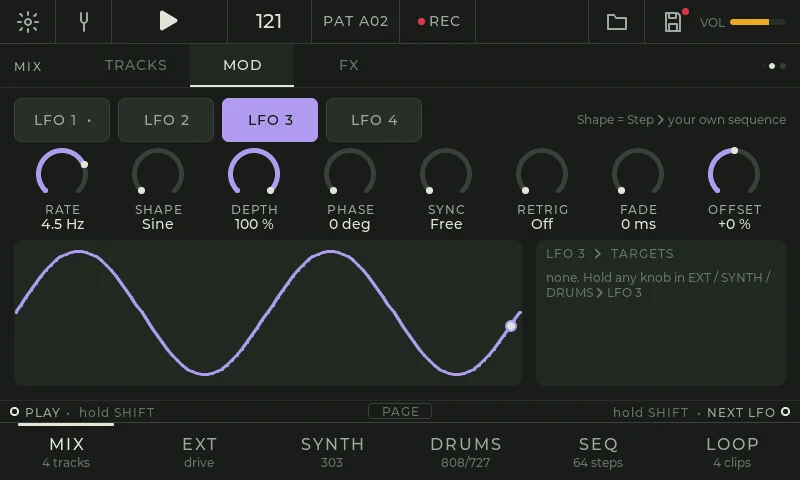
Four LFOs shared by the whole pedal. Hold any knob, on any page, and pick an LFO: the knob gets a badge, and you see it move. A Step shape turns an LFO into a 16-step modulation sequence you draw with your finger.
- Shape sine · tri · saw · square · S&H · step
- Rate 0.05–20 Hz
- Sync 1/32 – 4 bars
- Depth · Phase · Offset
- Retrig off · note
- Fade in
- 16 routes
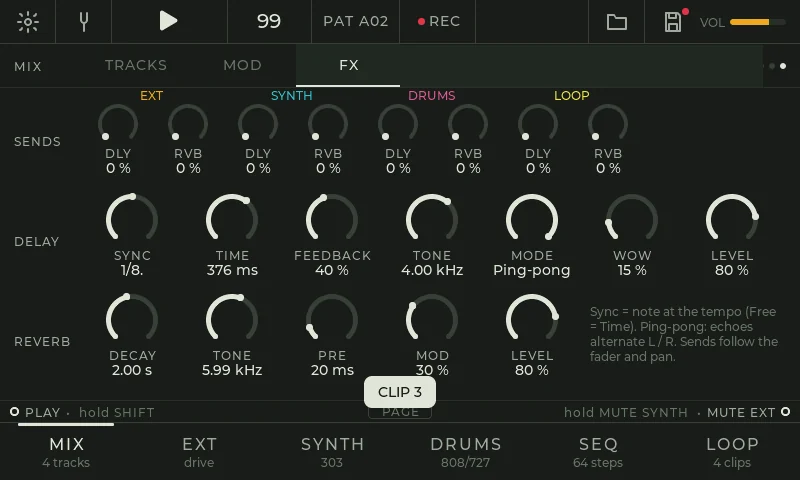
FX
Every track has a delay send and a reverb send, the looper included. Throw a snare into the delay, wash the guitar in reverb, and push the feedback until the echoes run away.
- Delay sync free · 1/16 – 1 bar, dotted, triplet
- Stereo or ping-pong
- Feedback to 95 %, soft-clipped
- Tone · Wow
- Reverb decay 0.3–20 s
- Tone · Pre-delay · Mod
TRACKS
A strip per track with fader, pan, mute, solo and a meter.
Play it live
Hands on the strings, feet on the switches
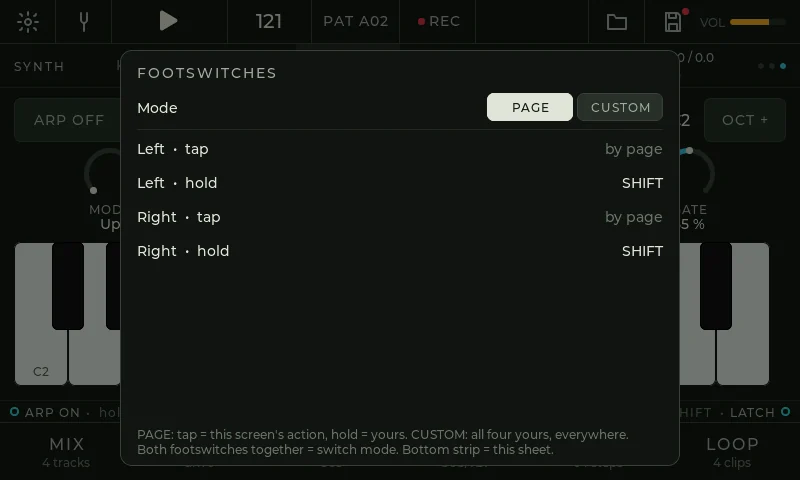
Footswitches
Each footswitch has a tap and a hold. In PAGE mode the tap does what the current screen needs (play, next pattern, octave, loop record, next clip) and the holds are yours. In CUSTOM mode all four are yours. Press both footswitches together to switch modes. The strip above the section bar always shows what each footswitch will do.
- Play / stop
- Rec
- Next / previous pattern
- Tap tempo
- Shift
- Save
- Mute EXT / SYNTH / DRUMS
- Arp · Latch · Octave
- Next LFO
- Loop rec · Next clip · Loop undo · Loop stop
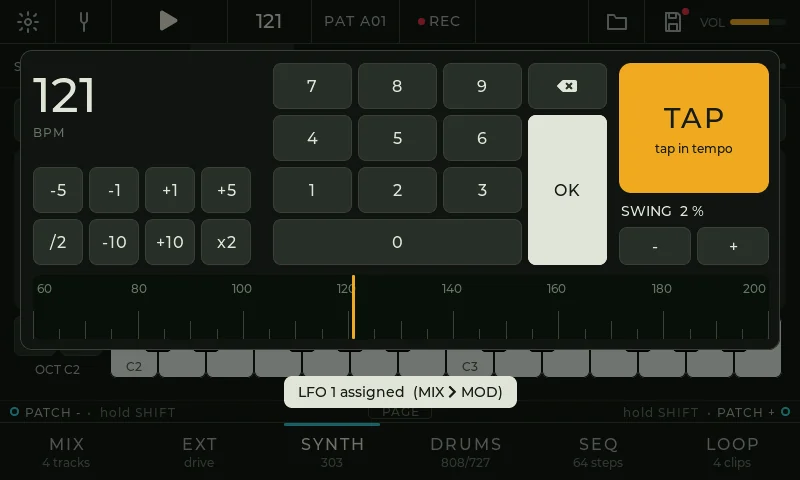
Tempo
Tap the BPM on the top bar for the tempo sheet: type a number, nudge by 1, 5 or 10, halve or double it, slide the ruler, or tap it in. From 40 to 240 BPM, with tenths if you want them. Swing sits right under TAP. Tap PAT next to it to pick any of the 16 patterns.
Projects
Eight projects live in the pedal, each with its own name. A project keeps everything: tempo, swing, the patterns of every track, every sound, the LFOs and routes, the mixer, the footswitch map and the latched arp chord. Each save keeps the previous copy, so a power cut in the middle of a save can't lose the project.
Install
Built in your browser, from your own file
The page never hosts Hotone's firmware. You give it the official Ampero Mini V2.2 file, it builds Dubshift 2.0 from it on your computer, and nothing is uploaded.
- Back up your presets and IRs with the Hotone editor, and keep the stock V2.2 file. You'll need it to go back to the stock firmware.
- Build Dubshift 2.0 below from the official file.
- Flash it with Hotone's editor: choose Firmware Update and pick the built file. Or flash it right from this page in Chrome or Edge: the button appears after the build. Wait until the pedal restarts and don't unplug it in between.
- Turn on multitouch. Ampero Minis leave the factory with the touch screen set to one finger. On the first start Dubshift offers to switch it to five, so the keys and the pads take chords. Confirm it with a footswitch.
You need the pedal and its USB cable, a computer with Hotone's editor, and the official Ampero Mini firmware V2.2 from Hotone's support page. To flash from this page instead, you also need Chrome or Edge, and the page reads the editor's Ampero Editor.exe once to talk to the pedal.
- Load the firmware file, as the .zip you downloaded or the .bin inside it.
- Check what goes in.
- Build. The file is checked before it's saved.
Going back to the stock firmware
Flash the stock V2.2 file with the Hotone editor (Firmware Update), or from this browser below. Your Ampero presets are in a part of the pedal that 2.0 doesn't touch. Multitouch stays on in the touch controller after you go back, and the stock firmware works normally with it. To set it back to one finger as it left the factory, choose 1 under Settings › Touch (fingers) before you flash the stock file. If the pedal doesn't start, unplug the power, hold footswitch 1, plug the power back in, and flash the stock file from update mode. Update mode is outside the firmware, so a firmware update can't break it.
Not in 2.0 yet
What's next
- 2.0 Guitar: the 2.0 interface over the Ampero's own amps, cabs and effects, with the 1.0 effects.
- Amps, cabs and your IRs on the EXT track, and more blocks in its chain.
- USB-MIDI: clock and notes from a computer or a keyboard.
- USB audio in and out.
- A poly synth and more synth engines.
- Song mode and pattern chains.
- Preset libraries for sounds, kits and patterns, shared between projects.
FAQ
Questions
Does 2.0 still have the Ampero's amps and effects?
No. 2.0 Groovebox replaces the stock sound engine with ours. The guitar goes through our own chain: drive, compressor, EQ, chorus and tremolo, then the delay and the reverb. If you want the stock sound with the new features, use Dubshift 1.0 now, or wait for 2.0 Guitar.
Do I lose my presets?
2.0 keeps its projects in its own part of the memory and leaves your Ampero presets where they are, so they are back when you flash the stock firmware. Back them up with the Hotone editor first anyway.
Are my loops saved?
No. Loops live in the pedal's RAM and are gone after a power cycle. Everything else in the project is saved.
Can it break my pedal?
Update mode is outside the firmware, and no update overwrites it, so the pedal can always be flashed back. There's no warranty. Read Going back before you start.
Ampero II Stomp?
Does it cost anything?
No. Every release is free. Soon you'll be able to support the work right here on the site, if you want to.
Credits and licences
The 2.0 firmware contains this third-party code. Each is used under its licence; follow the link for the full text, conditions and disclaimer.
- LVGL 9.3 (graphics library), Copyright (c) 2025 LVGL Kft. MIT.
- Inside LVGL: the TLSF memory allocator, Copyright (c) 2006-2016 Matthew Conte, BSD-3-Clause; the printf code, Copyright (c) 2014 Marco Paland, MIT.
- Montserrat font (built into LVGL), Copyright 2011 The Montserrat Project Authors. SIL Open Font License 1.1.
- Font Awesome Free 5 symbols (built into LVGL), by Fonticons, Inc. Font: SIL Open Font License 1.1, icons: CC BY 4.0. Licence.
- NXP MCUXpresso SDK drivers (clock, eLCDIF, GPIO, FlexSPI) and i.MX RT1052 device headers, Copyright 2016-2024 NXP, Copyright (c) 2015-2016 Freescale Semiconductor, Inc. BSD-3-Clause.
- CMSIS 5 core headers, Copyright (c) 2009-2023 Arm Limited. Apache License 2.0.
The site fonts (Barlow, Roboto) are under the SIL Open Font License.